Spot Rate Curve Interpolation
Source:vignettes/spot-rate-curve-interpolation.Rmd
spot-rate-curve-interpolation.RmdThe fixedincome package implements many interpolation
methods for spot rate curve. All interpolation methods inherits the S4
class Interpolation. Once you instantiate an Interpolation
object, it has to be set to a SpotRateCurve object and this is done
throught the curve’s interpolation<- method.
There is a list with the interpolation methods implemented and their constructors:
- Flat Forward:
interp_flatforward - Linear:
interp_linear - Log-Linear:
interp_loglinear - Natural Spline:
interp_naturalspline - Hermite Spline:
interp_hermitespline - Nelson Siegel:
interp_nelsonsiegel - Nelson Siegel Svensson:
interp_nelsonsiegelsvensson - Flat Forward COPOM:
interp_flatforwardcopom(thru copom package)
Here it follows an example on how to create and set an interpolation to a spot rate curve.
Let’s start by creating a curve using data obtained with rb3 package.
Firstly, the packages have to be loaded.
In order to build a term structure formed only by futures maturities,
the yield curve data and futures data have to be mixed and this is done
with the rb3::yc_brl_with_futures_get function, after the
data is downloaded with rb3::fetch_marketdata. Once the
curve is returned, the rows related to futures maturities can be
filtered. The first term, usually 1 business day term, is also used to
anchor the curve’s short part.
library(rb3)
refdate <- as.Date("2022-08-05")
fetch_marketdata("b3-reference-rates", refdate = refdate, curve_name = "PRE")
fetch_marketdata("b3-futures-settlement-prices", refdate = refdate)
yc_ss <- yc_brl_with_futures_get(refdate) |>
  filter(!is.na(biz_days))
yc <- bind_rows(
  yc_ss |> slice(1),
  yc_ss |> filter(!is.na(symbol))
) |>
  filter(!duplicated(biz_days))
#> # A tibble: 39 × 8
#> curve_name refdate forward_date cur_days biz_days r_252 r_360 symbol
#> <chr> <date> <date> <int> <int> <dbl> <dbl> <chr>
#> 1 PRE 2022-08-05 2022-08-08 3 1 0.136 0 NA
#> 2 PRE 2022-08-05 2022-09-01 27 19 0.136 0.137 DI1U22
#> 3 PRE 2022-08-05 2022-10-03 59 40 0.137 0.132 DI1V22
#> 4 PRE 2022-08-05 2022-11-01 88 60 0.137 0.133 DI1X22
#> 5 PRE 2022-08-05 2022-12-01 118 80 0.138 0.133 DI1Z22
#> 6 PRE 2022-08-05 2023-01-02 150 102 0.138 0.134 DI1F23
#> 7 PRE 2022-08-05 2023-02-01 180 124 0.138 0.135 DI1G23
#> 8 PRE 2022-08-05 2023-03-01 208 142 0.138 0.134 DI1H23
#> 9 PRE 2022-08-05 2023-04-03 241 165 0.138 0.134 DI1J23
#> 10 PRE 2022-08-05 2023-05-02 270 183 0.138 0.133 DI1K23
#> # ℹ 29 more rowsWith the curve data prepared, the spotratecurve is
created.
sp_curve <- spotratecurve(
  yc$r_252, yc$biz_days,
  "discrete", "business/252", "Brazil/ANBIMA",
  refdate = refdate
)

sp_curve
#>          SpotRateCurve
#> 1 day           0.1365
#> 19 days         0.1365
#> 40 days         0.1368
#> 60 days         0.1372
#> 80 days         0.1376
#> 102 days        0.1377
#> 124 days        0.1378
#> 142 days        0.1376
#> 165 days        0.1377
#> 183 days        0.1375
#> # ... with 29 more rows
#> discrete business/252 Brazil/ANBIMA
#> Reference date: 2022-08-05
From the output above it is possible to observe that this curve does not have an interpolation method defined.
Let’s, for example, define a flat forward interpolation for this
curve. The FlatForward object is created and set to the curve with the
interpolation<- method.
interpolation(sp_curve) <- interp_flatforward()

sp_curve
#>          SpotRateCurve
#> 1 day           0.1365
#> 19 days         0.1365
#> 40 days         0.1368
#> 60 days         0.1372
#> 80 days         0.1376
#> 102 days        0.1377
#> 124 days        0.1378
#> 142 days        0.1376
#> 165 days        0.1377
#> 183 days        0.1375
#> # ... with 29 more rows
#> discrete business/252 Brazil/ANBIMA
#> Reference date: 2022-08-05
#> Interpolation: flatforward
Now the output shows the curve with the interpolation defined.
Interpolate with [[
The spot rate curve method [[ is used to interpolte the
curve. The term is passed as a Term object or numeric and a spot rate
curve is returned with all interpolated values.
sp_curve[[c(21, 42, 63)]]
#>         SpotRateCurve
#> 21 days        0.1366
#> 42 days        0.1369
#> 63 days        0.1373
#> discrete business/252 Brazil/ANBIMA
#> Reference date: 2022-08-05
The term 21 doesn’t exist in the spot rate curve, so it is interpolated according to the interpolation method defined. Since the flat forward interpolation just connect the dots, the terms 42 and 63 have the same values of the spot rate curve.
Other interpolation methods can be set with the
interpolation method overriding any method set
previously.
interpolation(sp_curve) <- interp_naturalspline()
sp_curve[[c(21, 42, 63)]]
#>         SpotRateCurve
#> 21 days        0.1365
#> 42 days        0.1368
#> 63 days        0.1373
#> discrete business/252 Brazil/ANBIMA
#> Reference date: 2022-08-05
Shift the curve with basis points
A basis point (bp) is 0.01%, and rate changes are usually given in
basis points. bps() creates basis points, and adding them
to the curve shifts all its rates. The result is still a spot rate curve
with the same terms and interpolation, so the interpolated rates also
move.
shifted <- sp_curve + bps(50)
shifted[[c(21, 42, 63)]]
#>         SpotRateCurve
#> 21 days        0.1415
#> 42 days        0.1418
#> 63 days        0.1423
#> discrete business/252 Brazil/ANBIMA
#> Reference date: 2022-08-05
as.bps() shows the difference between two curves in
basis points.
A vector of basis points, one for each term, changes the shape of the curve. Here the short rates don’t move, and the long rates go up by up to 100 bps.
Unset interpolation
Set interpolation to NULL to unset the
interpolation.
interpolation(sp_curve) <- NULL
sp_curve[[c(21, 42, 63)]]
#>         SpotRateCurve
#> 21 days            NA
#> 42 days            NA
#> 63 days            NA
#> discrete business/252 Brazil/ANBIMA
#> Reference date: 2022-08-05
Note that for those terms in the [[ method that don’t
have a related term in the spot rate curve, NA is
returned.
Plot with interpolation
The fixedincome::plot method for the spot rate curve has
an argument use_interpolation that shows the interpolation
together with the curve points. This argument defaults to
FALSE.
interpolation(sp_curve) <- interp_flatforward()
plot(sp_curve, use_interpolation = TRUE)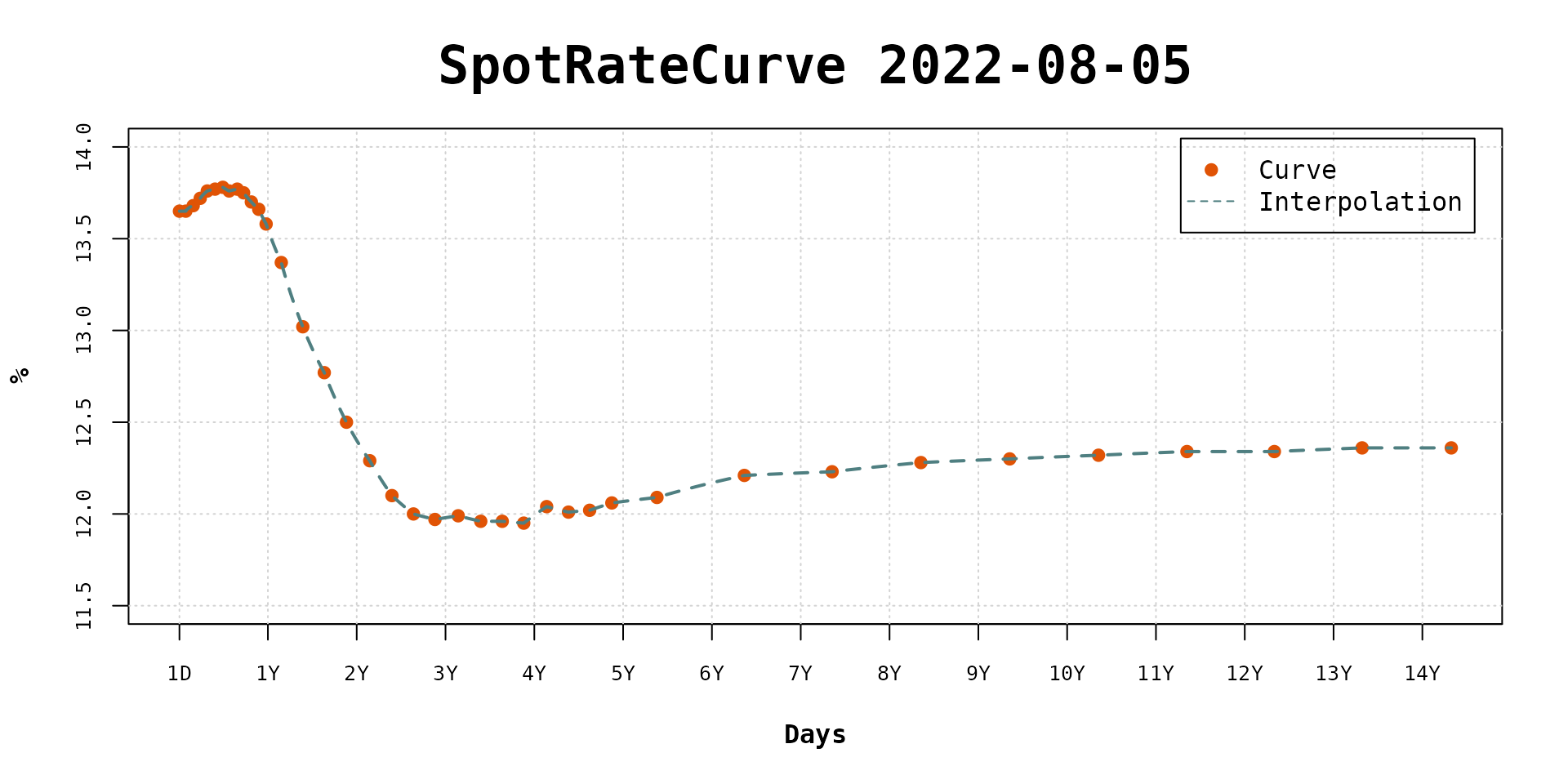
Forward rates with and without interpolation set
Once the interpolation is set, the plot method uses it
to calculate daily forward rates. Otherwise, it uses the forward rates
between the curve terms. Set the show_forward argument to
TRUE to show the forward rates.
interpolation(sp_curve) <- NULL
plot(sp_curve, show_forward = TRUE, legend_location = "bottomright")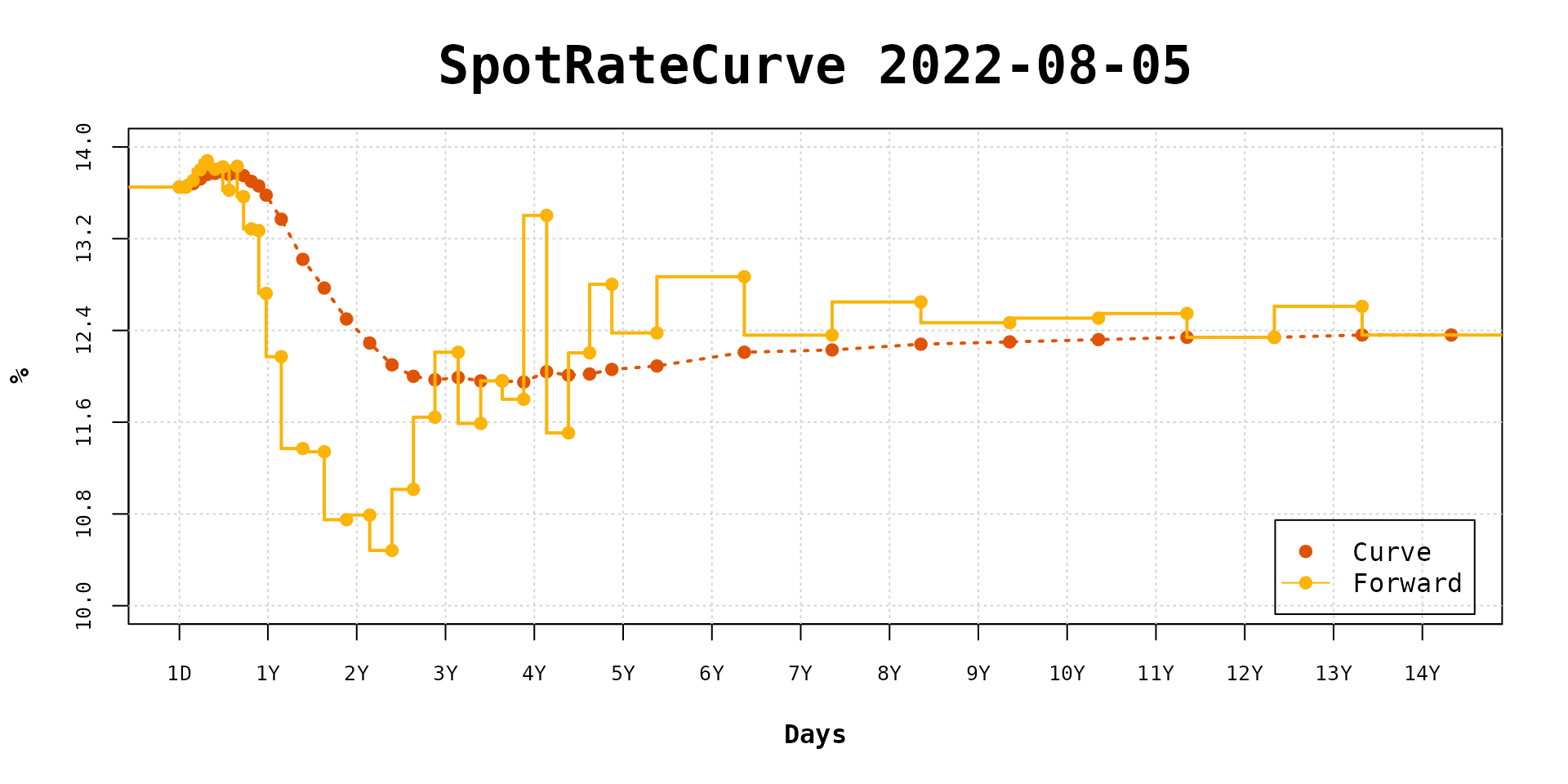
The forward rates are drawn with step lines.
If the use_interpolation argument is TRUE
then the daily forward rates are calculated with the defined
interpolation.
interpolation(sp_curve) <- interp_flatforward()
plot(sp_curve, use_interpolation = TRUE, show_forward = TRUE, legend_location = "bottomright")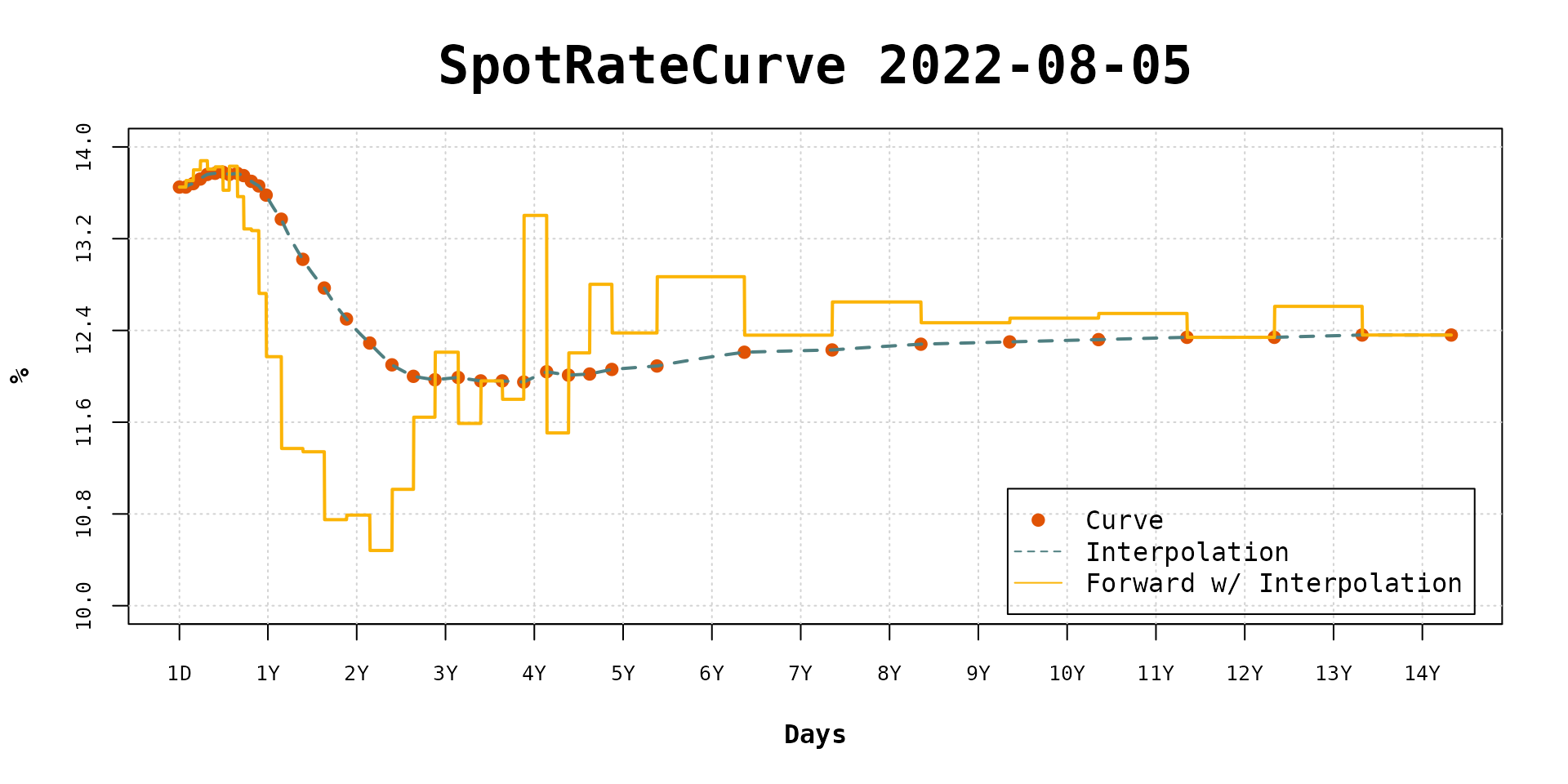
It is possible to note that the flat forward daily rates are fairly close to curve terms forward rates.
As the interpolation changes its effects can be viewed in the forward rates dynamic.
interpolation(sp_curve) <- interp_naturalspline()
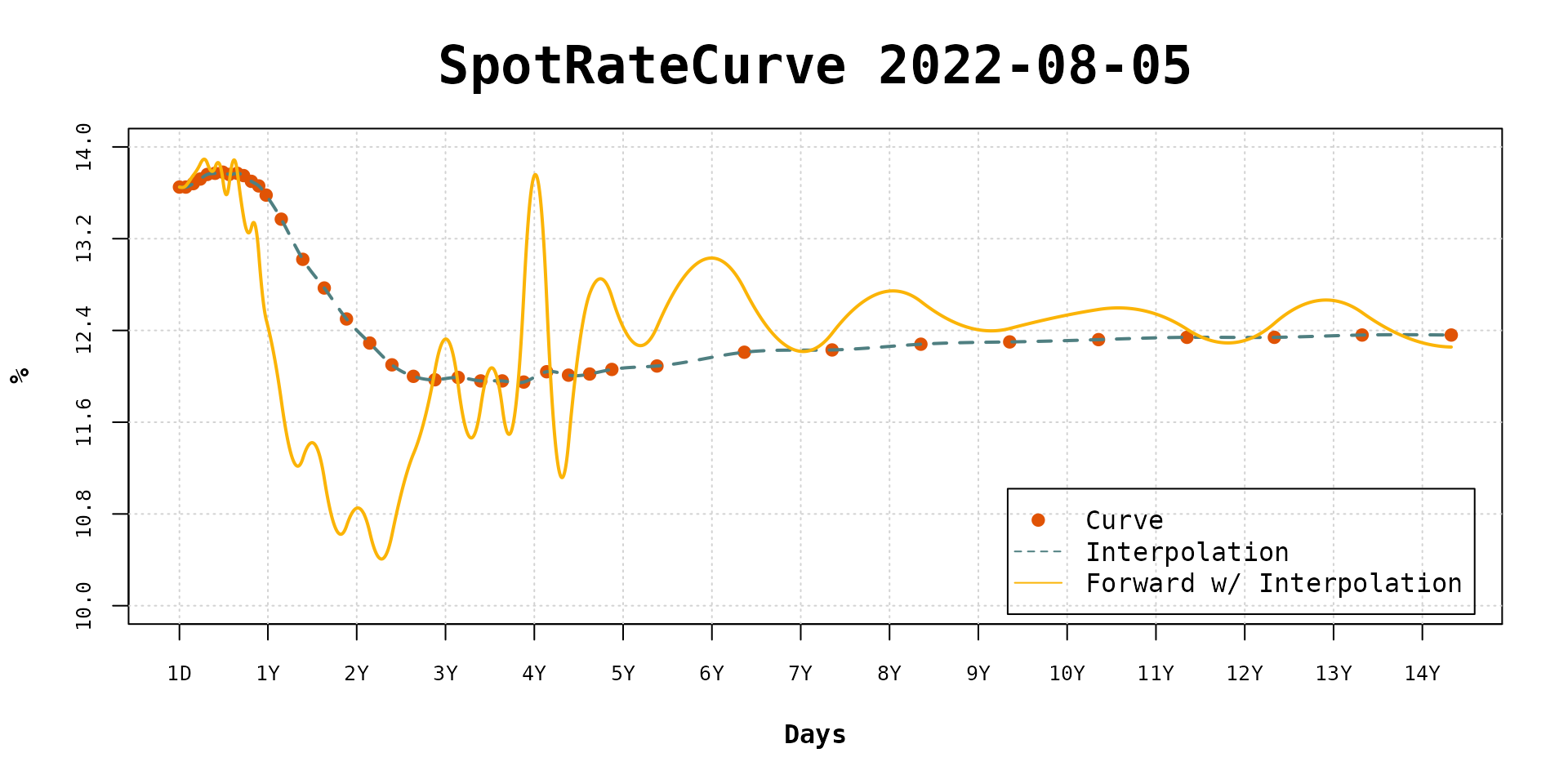
plot(sp_curve, use_interpolation = TRUE, show_forward = TRUE, legend_location = "bottomright")